Witness Transaction
2 Lessons
0% Completed
Formatting Witness Script

Version, Marker, Field - Configuring and Identifying A SegWit Transaction
Configuring & Identifying A SegWit Transaction
Few updates reverberated through the Bitcoin ecosystem like the all too famous 2017 user-activated SegWit soft fork - and for good reason! Not only did it solve (or at least placate, depending who you ask) a long war of attrition between two parties: small blockers & large blockers. More importantly, it culminated in a second, entirely new way to format a transaction.
Most developers, beginners or advanced, are usually aware of this, or at least have heard of “SegWit”. In fact, they might even already know that the latter (SegWit) inserts an entirely new section to the transaction known as a Witness:
But, given the raw hexadecimal of a random transaction, can you immediately spot whether it’s Legacy or SegWit?

If it takes you longer than ~two seconds then maybe it’s worth brushing up on your SegWit transaction knowledge (read-on, you’ll know by the end)! Breaking down a transaction, specifically a SegWit transaction, is particularly tough because so few resources cover the topic from beginning to end. There are phenomenal resources on dissecting a Legacy transaction, but almost nothing on SegWit & even fewer resources on the more recent TapRoot transactions.
We believe the single best way to improve working knowledge is to make it actionable. So, today & for the next few lessons, you’re going to inspect a SegWit transaction in its raw hexadecimal form. By breaking it down byte-by-byte, you’ll cover all the details involved in reading or writing a SegWit transaction.
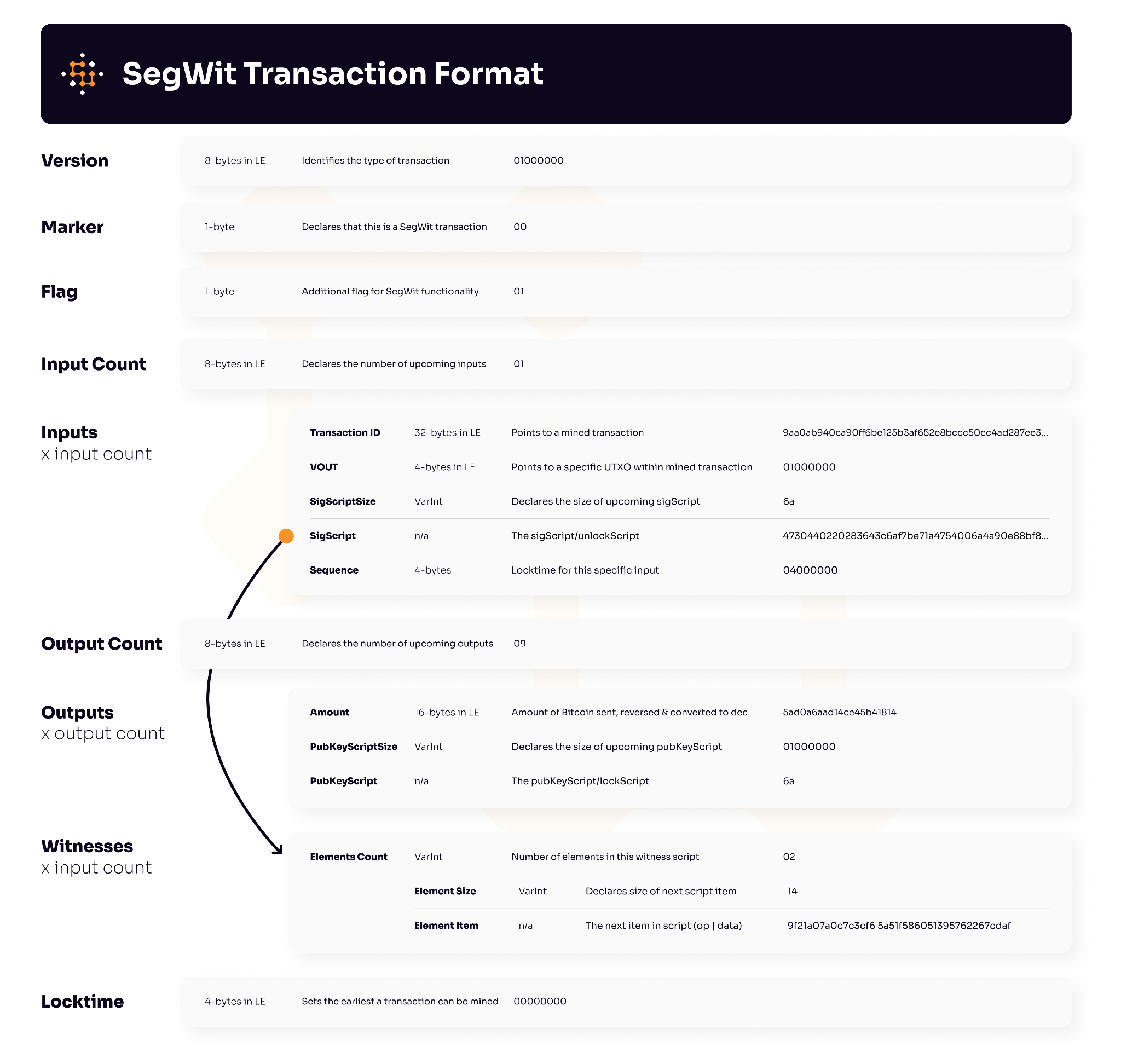
The table above looks intimidating, & the first few times it might feel challenging, but the tough part about understanding Bitcoin transactions is identifying & remembering minor details & exceptions.
Following the table above, we’ll walk-through a mainnet transaction & map it to every field. Below is both the transaction ID & it’s corresponding raw hexadecimal transaction:

Depending on whether you’re registered or whether you have freemium access, you can follow along in our deserialization tool by opening another window & clicking here.
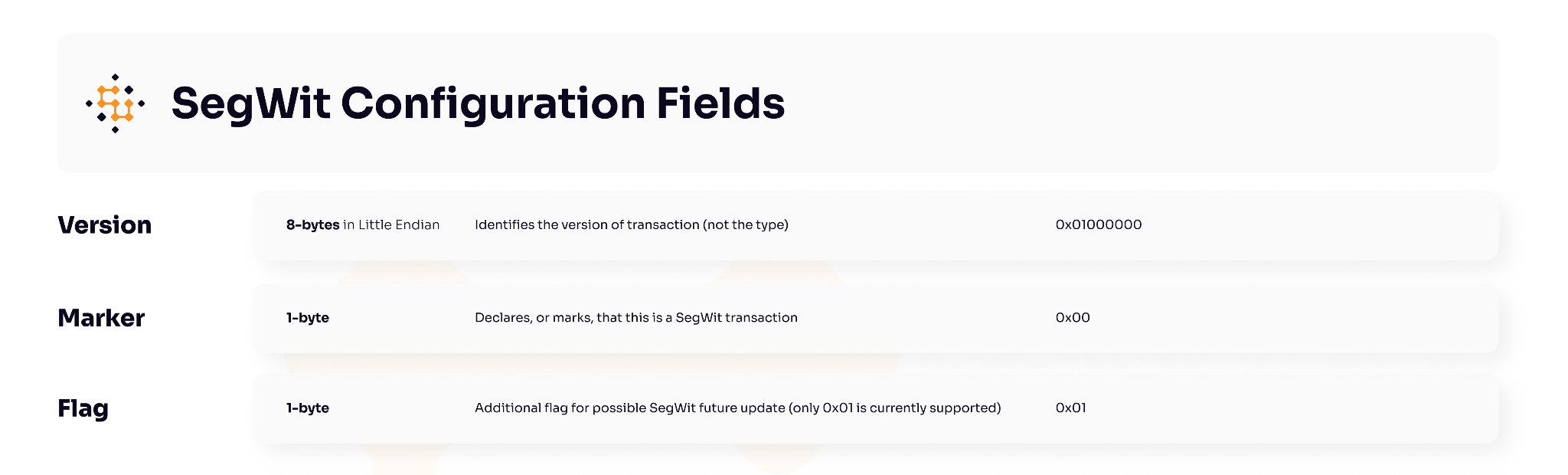
As the title suggests, today we’re covering the non-Witness parts of a SegWit transaction. Specifically, we’re focusing exclusively on the first basic three (3) fields found in a SegWit transaction:
While they have no official name as a group, we tend to think of these front-loaded fields as “settings” or “configuration” fields. Below is a summary of these three fields, we’ll review each field in detail.
Version (4-bytes | 8-characters)
The version field is always the very first field found in a transaction. It’s 4-bytes long (or 8-characters) & written in Little Endian format; all this means is that the bytes are reversed from their original value (for more info on Endian-ness play around with the data formatter linked). The end result of this format, as you’ll notice, is that the first byte holds some value while the remaining three (3) bytes are 0x00s.

Theoretically, these first four bytes have ~65k possible variations, however, that doesn’t mean that those versions are standard or accepted by nodes & the general Bitcoin network. In fact:
The Version field has only two recognized values that are relayed in the network
Both of these accepted version fields & the benefits behind the new implementation are provided below:
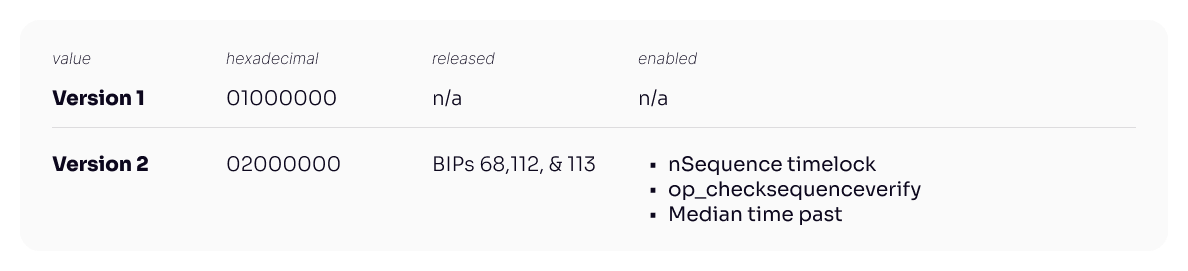
Noticeably, & this a fairly common trip-up, nothing in this version field indicates whether it’s a Legacy or SegWit transaction; contrary to popular belief, you’ll find both v1 SegWit transactions & v2 Legacy transactions: the version field has nothing to do with SegWit (this comes in the next field). Before we move on, let’s review exactly what benefits are provided in Version 2 (0x02000000) mentioned above:
nSequence Timelock (BIP 68)
The first of the three core benefits of Version 2 (0x02000000) comes from BIP 68 titled: 'Relative Lock-Time Using Consensus-Enforced Sequence Numbers.' That’s a really big mouthful to state that nSequence provides a timelock to an input. Previously, transactions had a single Locktime field positioned as the very last item & it covered everything in the transaction.
With nSequence Timelock, every (SegWit enabled) Input has a timelock slot positioned as the last field in an Input (after the ScriptSig) field; this allows users to specify the earliest block or time at which a transaction can be included in the blockchain, providing more customized control over the spending conditions.
Of particular importance, this specific BIP was critical for enabling Lightning, since, when a Lightning channel is opened, the funding transaction includes nSequence values to set relative timelocks for spending the channel's funds.
OP_CheckSequenceVerify (BIP 112)
The second main unlock from Version 2 comes in the form of an op_code OP_CHECKSEQUENCEVERIFY (CSV). CSV allows users to specify a relative time delay for spending a transaction output, measured in block height or time since the output was confirmed.
To make sure this is clear, both of the updates mentioned are responsible for introducing more granular time-based locking mechanisms. The former, nSequence Timelock (BIP 68) focuses on adding this feature to inputs, while the latter focuses on adding this features to outputs. Together, both BIP upgrades drastically changed the timelock capacity of not just whole transactions but specifically inputs & outputs.
Median Time Past (BIP 113)
The last of the three updates included in Version 2 also deals with timelock mechanics, however, this time the focus isn’t on adding a feature as much as it’s safe-guarding an existing parameter. Prior to this update, the primary timestamp used for the singular timelock feature was the timestamp included in the mined block; however, this timestamp could be manipulated by miners to some extent so it was considered a subpar & possibly dangerous.
As a solution to improve the reliability of a locking/unlocking timestamp, BIP 113 introduced the “Median Time Past” timestamp. Instead of the block timestamp, time-based checks instead use the median of the previous eleven (11) blocks.
Marker (1-byte | 2-characters)
To answer the opening question, or in case you’re working on a customer parse, when reading through a raw transaction the quickest way to tell if it’s a SegWit transaction is to check the byte immediately after the Version field (aka the 9th-byte). If the 9th-byte is a zero-byte (aka equal to 0x00) then the transaction is indeed a SegWit transaction with a segregated witness section.

This 9th-byte, the second field we’re reviewing, is more accurately known as the Marker; which, as the name confirms, marks whether the transaction is a Legacy or SegWit transaction. Besides the zero byte (0x00), there is nothing else this field could signify since any other value would be parsed as a VarInt for the Input Counter field.
Flag (1-byte | 2-characters)
Last but not least, the third & final field we’re reviewing, which is adjacent to the Marker, is known as the Flag. This is also a single-byte value that acts as an indicator for SegWit transactions. It’s theoretically supposed to define future support for additional flavors of SegWit; however, for now, only the byte value of 0x01 is recognized as standard & relayed across the network:

As previewed in the introduction, the crux of the logic & work involved happens in the Inputs, Outputs, & Witnesses section. Seen above, the first three fields (Version, Marker, Flag) are indeed simply setting & configuration fields for a SegWit transaction.
In Closing
With the first three fields out of the way, in the next lesson, we’ll now move on to the most complicated section of any transaction:the Inputs field. As we’ll see shortly, maintaining backwards compatibility between Legacy & SegWit can be tricky; with the introduction of SegWit, unfortunately, Inputs become even more involved.