Witness Transaction
2 Lessons
0% Completed
Formatting Witness Script

Version, Marker, Field - Configuring and Identifying A SegWit Transaction
Intro
SegWit, short for Segregated Witness, is by far one of the most important & impactful updates to Bitcoin & specifically to the formatting of scripts within Bitcoin transactions. Introduced in 2017 through BIPs 141, 143 & 144, SegWit was Luke Dash Jr. 's attempt to ameliorate the on-going Small Block vs. Large Block culture war that had been burning in the background for multiple years.
Covered more deeply in the opening Lesson of this Module, SegWit found an acceptable (admittedly temporary) solution to the block space, transaction malleability & transaction fee issues that both parties were concerned with. Please review the opening Lesson for more info in-depth such as the acknowledged trade-offs from both sides.
Regardless, the engineering details of SegWit are what we’re interested in today. At a high-level, the mechanics for how the format changes from Legacy to SegWit can be summarized in two steps:
- 1. The ScriptSig (or Unlock Script), typically found after the ScriptSigSize field & before the Sequence field, is shifted to a section called “Witnesses” now found after Outputs
- 2. The ScriptSig, typically formatted as an array of bytes, is now casted to an array of tuples instead
A shift & a re-format. Both of these steps are necessary to understanding SegWit; today, however, we’ll strictly focus on the 2nd, bolded step - aka how exactly is a Witness formatted?
Shift
Before we inspect the formatting shift, let’s quickly review the previous lesson. Shown in the article before, in contrast to a Legacy input, a SegWit input separates, or segregates, the ScriptSig from the input to the Witness section. All this means is that ScriptSig is moved around & is no longer adjacent to the rest of the input but is now located after the Output section:
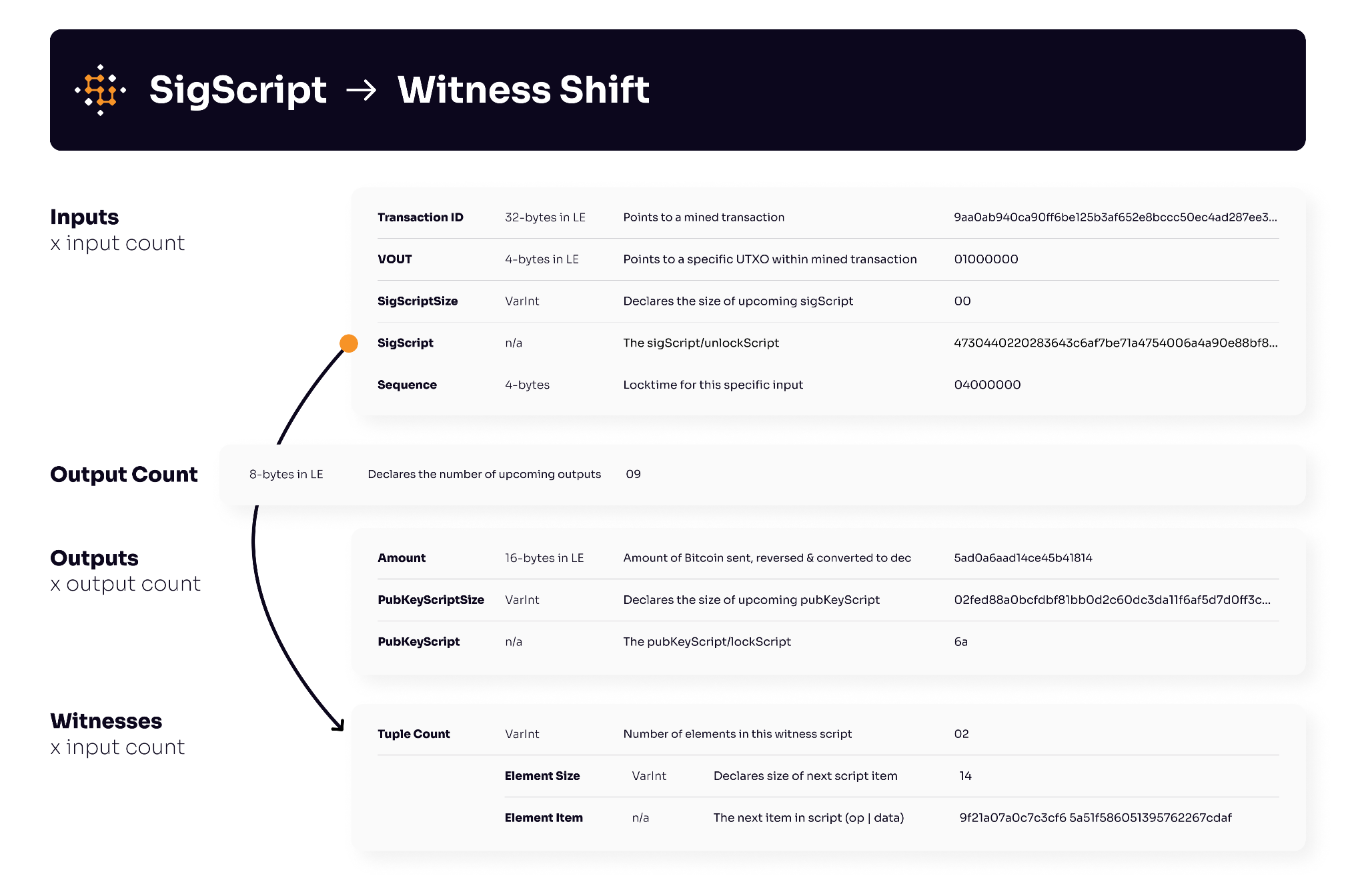
One would assume that the format of the ScriptSig itself would stay the same, alas, as we see above & we’ll expand on in detail shortly, one would be mistaken.
Format
The main lesson we’ll cover today is the implementation details & formatting differences between an Input ScriptSig & a SegWit Witness. Let’s first start by exhausting the possible names we’ll hear & summarizing the format differences in paragraph form:
In Legacy transactions, Inputs have only ScriptSigs/UnlockScripts that are parsed as arrays of bytes.
In SegWit transactions, some Inputs have ScriptSigs/UnlockScripts & some Inputs have Witnesses/WitnessesScripts that contain a size flag & are parsed as arrays of. tuples.
In the latter, a SegWit Witness, each tuple contains two items. The first, a VarInt size indicator, which flags the size of the next chunk of data that’ll be pushed to the stack. The second is the actual next chunk of data - whether this is an op_code or pushed data like an ECDSA signature or hashed public key.
Below is a nice table that breaks down this difference in structure which we’ll cover in detail further below:
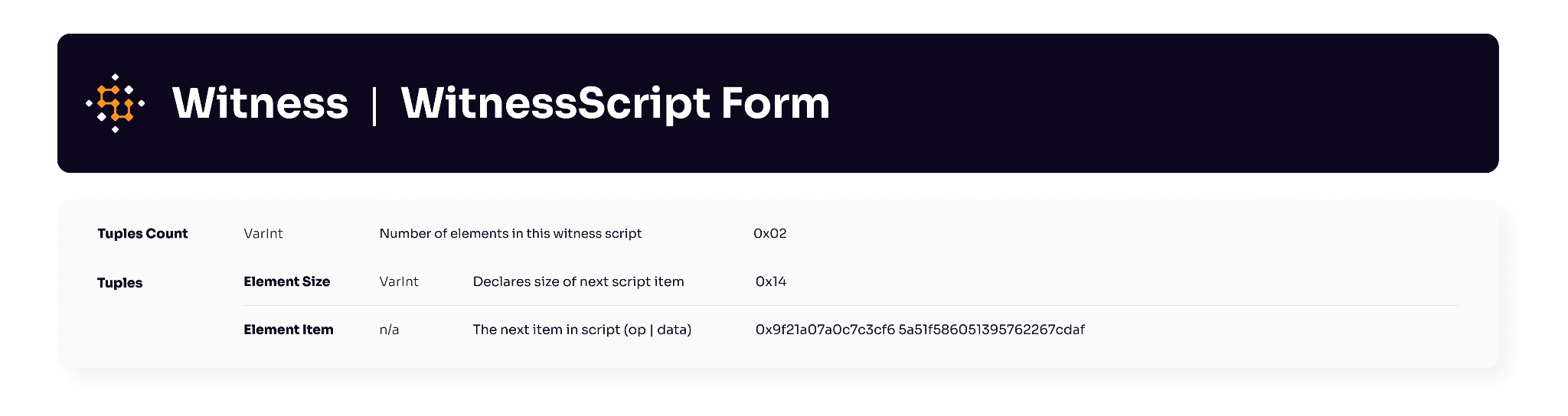
Witness | WitnessScript | SegWitWitness
The Witness, as previewed above, is not just an array of tuples as the array; much like ScriptSig is preceded by ScriptSigSize, the array of tuples is also preceded by a counter that flags to the length of the array / how many tuples to inspect. Each Witness or WitnessScript can be better understood by breaking it down into two distinct parts - the image below shows an example of a witness split up into the tuple count followed by the array of tuples:
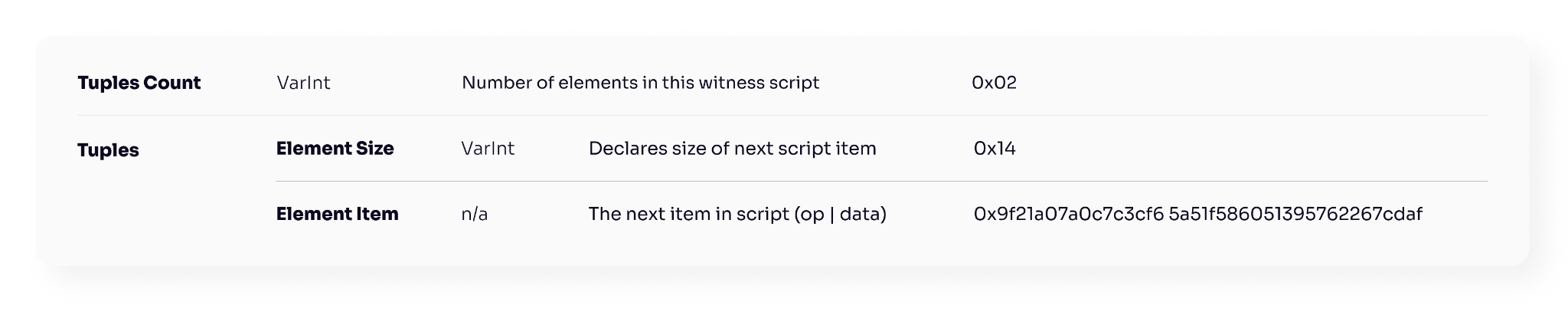
OP_PUSH20 | OP_PUSH21
Together, both of these parts cumulatively make up the “Witness Script.” We’ll review each individual part next.
Tuple Count (VarInt)
The first item in any Witness Script is a VarInt counter that dictates how many items are in this witness / witness script; specifically, it dictates how many tuples are in the upcoming tuple array. It’s worth highlighting the similarities & differences to the functionality-equivalent ScriptSigSize flag found in Inputs:
- - In a Legacy ScriptSig, we provide the ScriptSigSize, a VarInt, that provides the length of the entire script in bytes
- - In a SegWit WitnessScript, we provide the tuple counter, a VarInt that provides a count of the amount of tuples
Inspecting, we notice that the first item in both scripts is a VarInt with instructions on what’s next, however, they mean entirely different things. The former, the ScriptSigSize, is the length of the entire script, as one, in bytes. The latter, the tuple counter, is a count of all of the different pieces of the script that in aggregation make up the entire script.
They both start with VarInts & communicate, by either length of the script or count of the items in the script, the size of the script. With that understood, let’s dive into the two-item tuples that make up the Witness Script.
Tuple Array
The single-largest difference & likely largest source of confusion between an Input ScriptSig & a SegWit Witness is that the former directly expresses script elements (pushed data & op_codes) as hexadecimal string while the latter expresses script elements in an array of tuples.
Script, prior to the SegWit user-activated softfork, had a single format as an array of hexadecimal bytes. For both Input ScriptSigs & Output PubKeyScripts, this format was consistent. SegWit changed this by introducing a second way to express a script: as an array of two-item tuples.
What’s in these tuples? Well, as you saw in the preview above, the Witness/WitnessScript is separated by items into tuples & inside of each tuples we find two items:
- 1. Item Size: The size (in VarInt) of the next script item
- 2. Item: The next script item expressed in hexadecimal
This seems more complicated than it. The best way to demystify anything is to work through examples - so we’ll do exactly that:
Example: OP_1 + OP_2 + OP_ADD
Legacy 0x515193
0x51 = OP_1 (pushes the number 1 to the stack)
0x51 = OP_1 (pushes the number 1 to the stack)
0x93 = OP_ADD
SegWit 0x015101510193
{0x01, 0x51} = size of item is 1 byte, that item is 0x51
{0x01, 0x51} = size of item is 1 byte, that item is 0x51
{0x01, 0x93} = size of item is 1 byte, that item is 0x51
As seen above, a client would need to parse each type of script format differently. In the example above, since each item is an op_code, the length of each item was a single (0x01) byte - so the SegWit equivalent of the starting example held tuples where the size was consistent.
Continuing the example, what precedes each script? As discussed in theTuple Count section above, both Legacy & SegWit express different indicators of size.
Legacy length of script in bytes 0x03
SegWit length of tuples array 0x03
Again, if we measured the length of the script for SegWit, we’d end up with a different number. Now that we know what precedes the tuple array, let’s write the complete Legacy (with the preceding ScriptSigSize) & the complete SegWit script:
Legacy 0x03515193
SegWit 0x03015101510193
From an array of bytes to an array of tuples, that’s basically the “challenging” part to grok from SegWit which we hope these two examples above made it clear.
Closing
And that’s it in terms of understanding exactly what the Witness in SegWit is & how it compares to the traditional Input ScriptSig! In the previous article we reviewed how the separation, or segregation, shifts the ScriptSig from the Inputs section to the Witnesses section; & now, with this article, we covered the formatting changes that happen along with this shift in placement.
With both of the core mechanics involved in going from ScriptSig to a Witness covered, you hopefully have a better grasp on the differences between a Legacy & SegWit transaction.